
Choicer Voicer Multiplayer
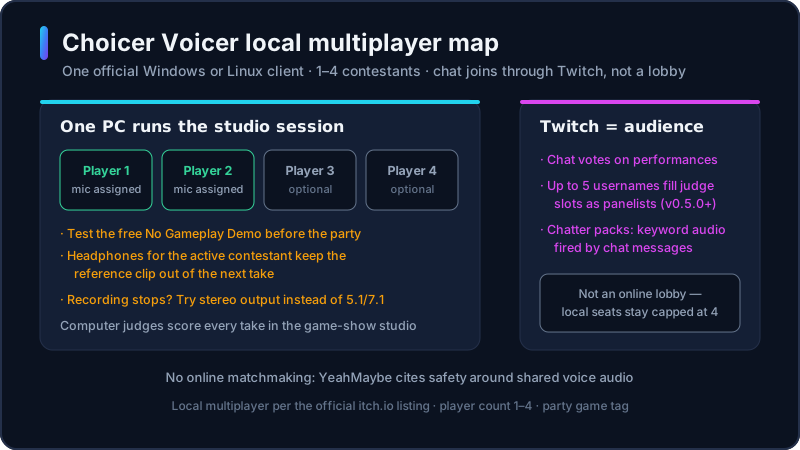
Searches for Choicer Voicer multiplayer, a two-player or 4 player party game, or a multiplayer voice game usually want the same answer: the official client is local, on one Windows or Linux machine, for up to four people. Twitch modes add chat, not a remote lobby.
choicervoicer.info is an independent fan site. We are not affiliated with YeahMaybe. This page does not host the game or unofficial multiplayer patches.

Does Choicer Voicer Have Multiplayer?
Yes, but only locally. YeahMaybe’s itch.io listing says most modes are singleplayer, and that a simple local multiplayer version exists for up to four players at once. The store tags the game as local multiplayer and a party game, with a player count of 1–4. Computer judges score the vocal impressions in the game-show studio.
Online multiplayer does not exist at this time. The same store page says the skill ceiling is high and that privacy and security come first. In a later Q&A, YeahMaybe added that prototypes exist, but a public online mode is not planned for the foreseeable future because of safety risk around shared voice audio, especially for streamers.
The unofficial browser player on this site is a solo tryout. It cannot run the desktop party session. If you need the Windows or Linux client, use the download guide. Stay here when the question is how many people can play, how to set the room up, or what Twitch mode actually does.
Local Multiplayer Setup
YeahMaybe describes a simple local session, not a matchmaking lobby. These steps cover a typical 1–4 player party on one official Windows or Linux client.
- 1
Install the official client on one PC
Buy or update The Choicer Voicer from YeahMaybe on itch.io. Local multiplayer needs that desktop build. The unofficial browser player on this homepage is solo only.
- 2
Test recording before you invite people
Use the free No Gameplay Demo on the store page. YeahMaybe warns that some audio setups never record. Fix that on one mic before four people are waiting.
- 3
Add at least one voice pack
The studio ships with little built-in content. Install official Packs & References or a trusted community folder so the room has lines to imitate.
- 4
Assign each microphone on the setup screen
Give every seated player their own input. Skip that assignment and voices bleed into the wrong turn. Confirm a test take plays back, not only live monitoring.
- 5
Start the studio session for 1–4 players
The official listing describes a game-show studio that computer judges score. One person performs at a time. Keep the rest of the room quiet during a take.
- 6
Use headphones if the reference clip leaks into the mic
Same-room speakers replay the prompt into the next recording. Headphones keep the reference out of the take. Surround output (5.1 / 7.1) is the setup YeahMaybe flags most often when recording stops.
How Many Players Can Play?
Official player count is 1 to 4 on one machine. Two-player and 4 player searches are the same mode with fewer or more seats filled. There is no fifth local contestant slot in the store description.
That limit is local, not “four people on four PCs.” Everyone sits at the same computer, or at mics wired into that computer. Remote friends are not an official lobby. YeahMaybe has said the stopgap people try is routing a call such as Discord into the game; they also said they have not used that path themselves and that the mic delay is large.
If more than four people want in, the official extra path is Twitch, not a fifth chair. Chat can vote or trigger chatter-pack lines. That is streaming, not a second local seat.
Microphone Setup for Party Play
Party play fails most often on audio, not on the player-count setting. YeahMaybe’s store warning is blunt: some setups never record, the issue may relate to surround-sound output, and you should test the free No Gameplay Demo before you pay. Live playback that you can hear is not the same as a saved take.
On a four-person couch, assign each mic before round one. A shared room mic will capture the audience laugh and the next player’s coaching. Headphones for the active contestant keep the reference clip out of the recording. Close other apps that hog the input.
If recording stops mid-round, try stereo output first. That is the workaround already documented on this site’s homepage mic notes and on YeahMaybe’s store page. A dedicated in-browser mic-test tool is planned later. Until then, use the official demo and the homepage microphone section.
Twitch Mode
YeahMaybe lists modes dedicated to Twitch streamers. Chat commands can be read in-game. A store feature is a variant that lets Twitch chat vote on performances. Version 0.5.0 also added Twitch Panelist voting: assign up to five Twitch usernames to judge slots; blank slots still use the computer.
Chatter packs are a separate content type from voice packs. They are collections of audio files, each with keywords. When a viewer uses a keyword, that audio plays in the show. That lets chat vocalize without sitting in a local contestant seat.
Twitch mode is not Choicer Voicer multiplayer in the matchmaking sense. You still run one official client. Local contestants stay inside the 1–4 limit. Chat is the audience and, if you enable it, the jury. YeahMaybe’s Q&A says future work is more likely to make streaming a session to friends easier than to ship a public online lobby.
Best Packs for Multiplayer
We do not host a ranked party-pack chart. These are the pack types that actually change a local session, based on YeahMaybe’s customize slots and how a same-room group uses them.
Short voice packs you already know
Clip folders you imitate. Short lines the room recognizes keep turns moving. A huge unfamiliar set stalls a party.
Official Packs & References first
YeahMaybe’s itch.io samples match the current client. They are the safest first install before you stack community folders.
Host and judge packs
New introductions and reactions without changing the prompts. Useful when the same voice pack is getting a second night.
Studio and menu packs
A different room and chrome for the same 1–4 player loop. These restyle the broadcast; they do not add online seats.
Chatter packs for Twitch nights
Keyword audio for chat, not extra local contestants. Skip these if nobody is streaming.
Twitch Mode on Screen
The official Twitch Mode intro shows exactly how chat judging works: your viewers take over the score panel while you perform.
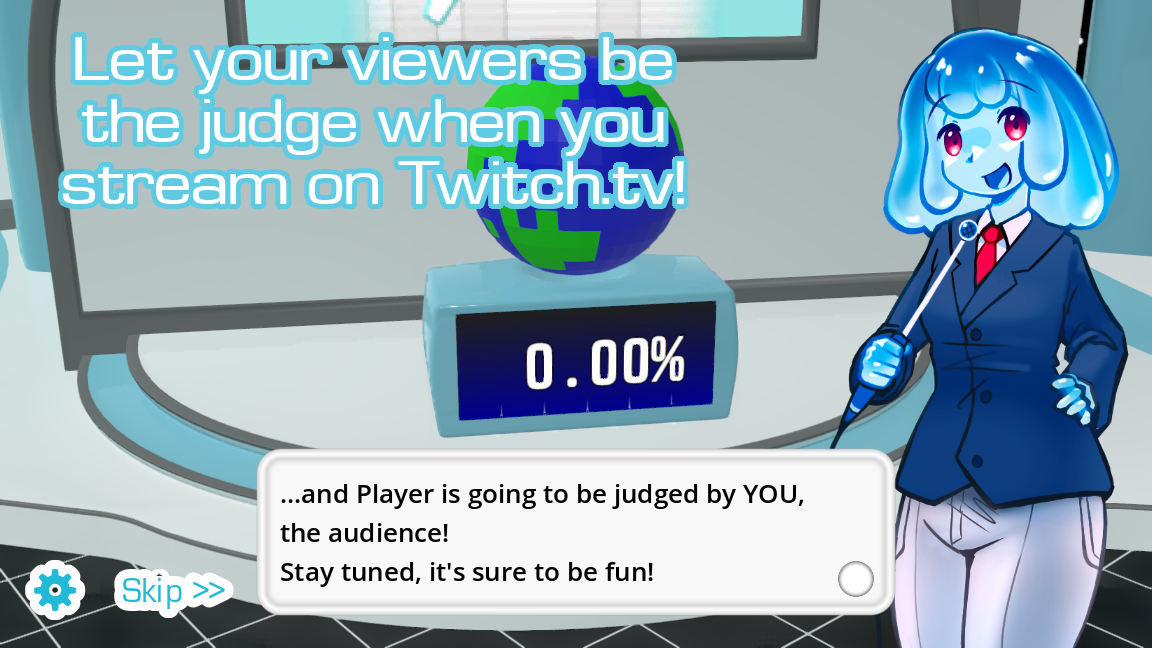
Game screenshots on this page come from YeahMaybe's official itch.io listing for The Choicer Voicer. All game art belongs to YeahMaybe.
Multiplayer FAQ
Related Choicer Voicer pages
After you know the session is local, get the official client, add a voice pack, or check microphone notes before friends arrive.
Set up one PC, then invite the room
Choicer Voicer multiplayer is local party play on the official desktop client. Get Windows or Linux from itch.io, test the mic, assign inputs, and keep Twitch for chat — not for a fake online lobby.