
Choicer Voicer Mac
Searches for a Choicer Voicer Mac version usually end on fake download pages. This guide quotes the official status instead: the game ships for Windows and Linux, the developer says it is not designed for macOS, and no Mac build is offered anywhere official.
choicervoicer.info is an independent fan site. We are not affiliated with YeahMaybe. This page does not host the game or any Mac download.

Is There a Choicer Voicer Mac Version?
No. The Choicer Voicer has no official macOS version. YeahMaybe’s itch.io store page lists exactly two desktop builds — Windows and Linux — and states that the game is not available for macOS and not designed for Chromebook. There is no Mac download on the official page, and no other official source exists.
This is not a rumor the community argues about. It is the answer the developer’s own store page gives, and the itch.io community keeps a long-running thread titled “No, there is no version for macOS at this time.” to catch the question as soon as it comes up again. The thread has drawn roughly 20,000 views and 40-plus replies, which tells you how many Mac users go looking.
If a page offers you a “Choicer Voicer Mac download”, it is not offering the game. Read the safe-search checklist below before you click anything.
What the Developer Says About macOS
YeahMaybe’s store page makes the platform list explicit: The Choicer Voicer is available for Windows and Linux, and the page adds that the game is not designed for macOS, nor for Chromebook. Those two sentences are the complete official answer.
Two itch.io community threads carry the same Mac ask — the pinned “No, there is no version for macOS at this time.” and an earlier “Will this be made available on Mac?”. The pinned thread’s phrase “at this time” matters: it leaves room for a future change without promising one. As of the last time we checked this page, no macOS build and no Mac announcement exists on the developer’s itch.io page.
Because the developer communicates platform changes on itch.io, that store page is the only source to trust. If a Mac build ever appears, it will be listed there first — not on an aggregator or a download site.
Why There Is No Mac Build
YeahMaybe has not published a detailed technical explanation, so the honest answer is: supporting macOS is work the developer has chosen not to take on so far. Small solo projects routinely ship for one or two platforms first, and every additional platform multiplies testing, packaging, and bug-triage work.
What we can say from the store page itself: the game is sold as a Windows and Linux product, the current Recommended files are 0.5.3 for both, and even the free No Gameplay Demo is offered per platform rather than as a Mac build. Treating macOS as out of scope is a stated position, not an oversight.
Do not confuse “no Mac build” with “broken Mac build”. There is nothing to fix, patch, or crack — the product simply does not exist for macOS. That distinction is what fake download pages blur on purpose.
What Apple Users Can Do Instead
Two real options exist for Mac users. Neither requires downloading a suspicious file, and only one gives you the full game.
- 1
Try the unofficial browser player on this site
The browser player on our homepage is an HTML5 page, so it opens in Safari, Chrome, or Edge on a Mac just like on Windows. Grant microphone access after you press Play, and record a short take to confirm playback. It is a tryout only — no packs, no Dub Mode, no party play.
- 2
Play the full game on a Windows or Linux machine
The only official path to the complete game is the itch.io client on Windows or Linux, currently the 0.5.3 Recommended files. If you have access to such a machine, that is where packs, Dub Mode, and local multiplayer work.
- 3
Treat virtual-machine setups as unverified
Running Windows in Parallels, VMware, or Boot Camp is a general-purpose idea people discuss for many games. We cannot verify any specific Mac virtual-machine setup for The Choicer Voicer, so treat reports you see — including ours — as unverified, and never pay for a “Mac-compatible installer” that claims otherwise.
Chromebook Status
The same store-page sentence covers Chromebooks: the game is not designed for Chromebook. There is no Play Store app, no Linux-port guide from the developer, and no official ChromeOS download.
The unofficial browser player is the only thing a Chromebook can realistically open, and school-managed devices often block microphone access entirely. If the mic prompt never appears on a school Chromebook, that is the device policy — not a hidden app you are missing.
What to Avoid When Searching “choicer voicer mac download”
Because no official Mac file exists, every “Mac download” result is fake by definition. Run this checklist before you touch any of them.
Any .dmg, .pkg, or “Mac installer” link
The official itch.io page has no macOS file, so a Mac installer cannot be genuine. Unsigned archives from file hosts, Telegram channels, or “repack” sites are untrusted binaries.
Sites wrapping the game name with “Mac” or “Apple”
Aggregator pages that rank for “choicer voicer mac” exist to catch this exact search. They host ads and installers, not the game.
“Mac version unlocked” or “Mac port” claims
No port has been announced by YeahMaybe. Anything claiming to unlock one is asking you to run unknown code.
Payment for a Mac build
The official game is sold on itch.io for Windows and Linux. Paying anyone else for a “Mac copy” does not get you the game.
Source: “No, there is no version for macOS at this time.” and the “Will this be made available on Mac?”# thread on the itch.io community, plus the official store page.
The Official Client, on Its Supported Platforms
This is the desktop client you would be installing — Windows and Linux only. The build above comes from the official listing; no macOS variant exists to screenshot.
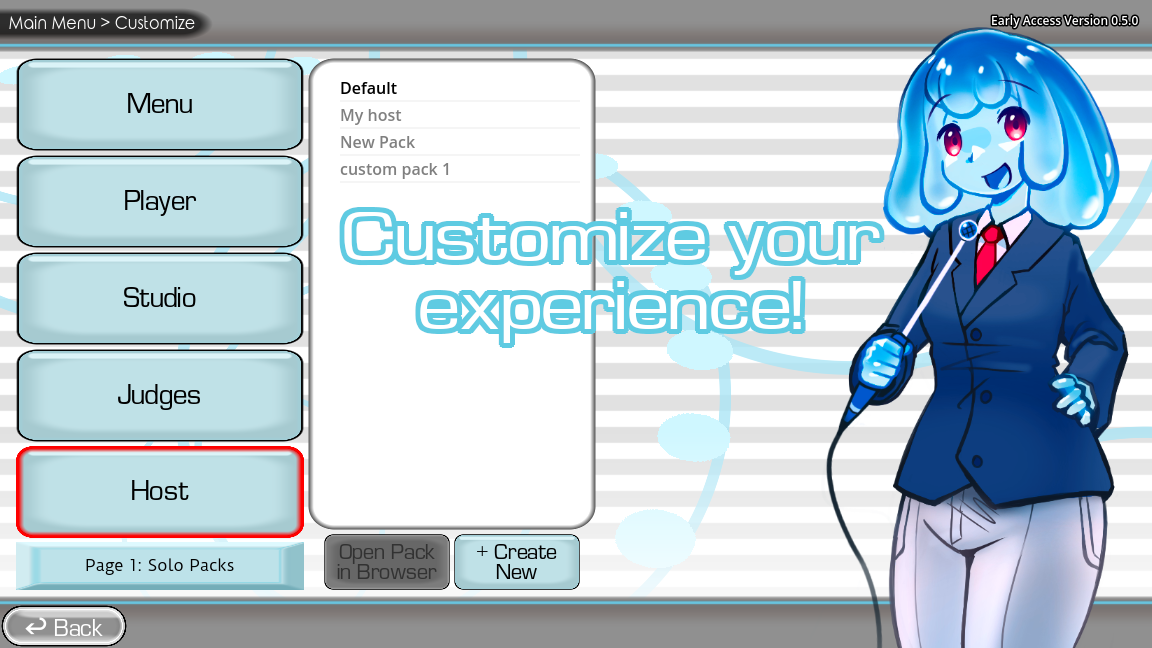
Game screenshots on this page come from YeahMaybe's official itch.io listing for The Choicer Voicer. All game art belongs to YeahMaybe.
Choicer Voicer Mac FAQ
Related Choicer Voicer pages
Get the official client for a supported platform, check the mobile answer, or start with the browser tryout on any device.
No Mac build — use the two real options
Try the unofficial browser player on this site for a quick round, or run the official Windows or Linux client from itch.io for the full game. Skip every “Mac download” result.