
Choicer Voicer Mobile
Searches for Choicer Voicer mobile, a Choicer Voicer app, or an Android or iPhone build usually want a store listing. There is no official mobile app. This page explains what works on a phone, what does not, and how to stay off unofficial APKs.
choicervoicer.info is an independent fan site. We are not affiliated with YeahMaybe. This page does not host an app or APK.

Is Choicer Voicer Available on Mobile?
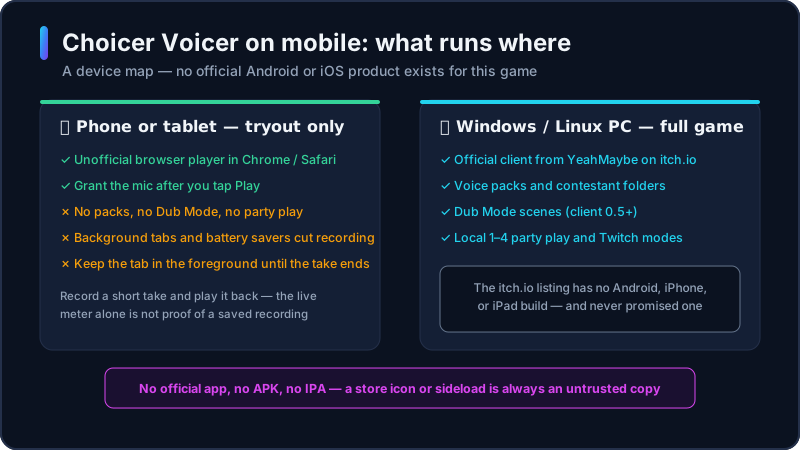
The official Choicer Voicer product is a Windows and Linux desktop client on YeahMaybe’s itch.io page. The listing does not include Android, iPhone, or iPad. If a result promises “the choicer voice app” in Google Play or the App Store, it is not the official game.
What you can do on a phone is narrower. This site’s unofficial browser player may open in a modern mobile browser so you can try a short voice challenge without installing anything. That is not the full choicer voicer game. Packs, Dub Mode, and party play still need the official desktop client.
Treat “choicer voicer mobile” as a device question, not a download question. If you need the installer, use the dedicated download guide and itch.io. If you only want to know whether a phone can join the loop at all, stay on this page.
Choicer Voicer Android
There is no official Choicer Voicer Android app and no official APK. Choicer Voicer mobile on Android is a browser tryout, not a Play Store product. An APK from a file host, Telegram, or “modded game” page is an untrusted binary — ads, malware, and no YeahMaybe updates.
Some Android phones can open this site in Chrome, tap Play Game, and grant the microphone. Background tabs, battery savers, and permission screens often interrupt recording. If the iframe fails, that is the unofficial embed — not a missing store listing.
For packs, Dub Mode, and party play, use a Windows or Linux PC and the official itch.io client. Choicer Voicer Android is a preview path, not a supported platform.
Choicer Voicer on iPhone and iPad
There is no official Choicer Voicer mobile app for iPhone or iPad, and no TestFlight build. Apple’s store has no YeahMaybe listing for this title. Do not sideload a random IPA or “iOS port”.
Safari or another iOS browser may load the unofficial player. Microphone prompts are strict: grant access after a tap, keep Safari in front, and avoid Low Power Mode. Silence on the first take is usually permission or focus, not a hidden iOS client.
For a reliable session, use a computer. iPhone and iPad are optional tryout devices for the browser challenge only.
Is There a Choicer Voicer App?
No official Choicer Voicer app exists for Android or iOS. Searches for “the choicer voice app” or “the choicer voice mobile” are looking for a store icon that YeahMaybe has not published. Community pages that wrap the browser game in a WebView and call it an app are still unofficial, and they add another party that can collect microphone audio.
The unofficial HTML5 player on this homepage is the only in-browser tryout we host. It is labeled as unofficial. It is not a replacement for the desktop client, and it is not an app you install from a store.
When someone sends you an APK, an IPA, or a “free Choicer Voicer app” link, close it. The safe split is: browser tryout on this site, official Windows and Linux files on itch.io, no mobile installer anywhere.
Can the Browser Version Use Your Phone Microphone?
Yes, in principle, if the mobile browser supports getUserMedia and you allow the prompt after you tap Play. The unofficial player should not ask for the microphone until that click. Grant access only when you intend to record. Pick the phone’s built-in mic unless you have a headset you already tested.
Phones fail this loop more often than desktops: background tabs, another app taking audio, a permission that never reappears, and iOS locking the mic when Safari is not in front. After you allow access, record a short take and play it back. Live monitoring is not enough.
If recording never starts, retry Play, confirm Microphone is allowed in site settings, and close apps that hold the audio device. A longer checklist is on the homepage. Desktop surround-sound issues belong on the download page, not here.
Mobile Troubleshooting
Allow the mic after Play, not before
Tap Play Game first. Then accept the browser prompt. A permission granted on a previous visit can still be stale after an iOS or Chrome update.
Keep the tab in the foreground
Lock screens, split view, and “media playing” notifications can cut the recording mid-line. Stay on this tab until the take finishes.
Turn off battery and data savers for the test
Android battery savers and iOS Low Power Mode freeze background tabs. Disable them for one attempt so you know whether the player can record at all.
Do not install an APK to “fix” the mic
A broken browser prompt is not a reason to sideload a fake Choicer Voicer app. Fix permission, then use a PC for the full game.
Confirm playback, not only the live meter
If you hear yourself in the room but the game never stores a take, the page did not get a usable recording. Retry the prompt and the input device.
Mobile FAQ
Related Choicer Voicer pages
After you know what works on a phone, use these pages to play, download the official PC client, or fix a microphone.
Try it in the browser, or get the PC client
Use a phone only for a short unofficial tryout. For the real Choicer Voicer download, go to the PC guide and YeahMaybe’s itch.io page.