Choicer Voicer Dub Packs
Searches for Choicer Voicer dub packs, dub the choicer voicer, or a custom dub pack usually want Dub Mode content: timed lines plus a scene video, not a host or studio swap. This page maps that format, where YeahMaybe and GameBanana publish it, and how to install or build one folder at a time.
choicervoicer.info is an independent fan site. We are not affiliated with YeahMaybe. This page does not host dub packs, videos, or game files.
What Is a Choicer Voicer Dub Pack?
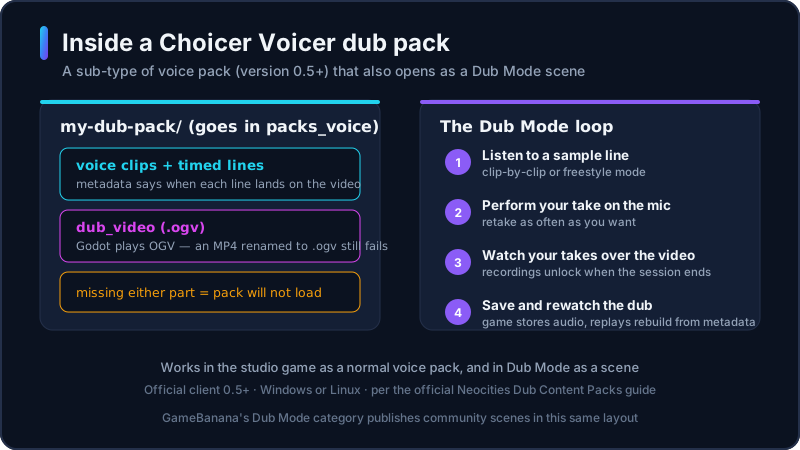
YeahMaybe’s version 0.5.0 notes call a dub pack a sub-type of voice pack. The clips still work in the studio game: a sample plays, you imitate it, and you can score. Extra files make the same folder usable in Dub Mode, the voice-over game that landed in that update.
The official Neocities content guide says a working pack needs two extras besides the audio: metadata that tells the client when each line lands on the video, and the scene itself in OGV. Godot, the engine behind The Choicer Voicer, plays OGV rather than MP4 or AVI. The video file must be named dub_video. If that file is missing or named something else, the pack fails to load.
Install the folder in packs_voice, the same place as a normal voice pack. A host, judge, or studio archive is not a Choicer Voicer dub pack. A clip folder with no timestamps and no dub_video will not open as a scene. The unofficial browser player on this site cannot load those folders. You need the official Windows or Linux client at version 0.5 or newer.
How Dub Mode Works
Dub Mode is the voice-over loop inside The Choicer Voicer. YeahMaybe’s store copy describes it as voicing a favorite scene. The official guide adds the session rules: you may retake a line as often as you want, but you do not hear your recordings until the session ends. After every sample is performed, the takes play over the pack’s video.
Version 0.5.0 shipped two play styles. Clip-by-clip dubbing walks the scene one line at a time. Freestyle Dub Mode plays the whole video live for a faster, looser pass. You can save and rewatch a dub, but the game stores audio, not a finished movie. Replays rebuild the scene from the pack metadata, so removing the pack later can break a saved take.
If Dub Mode looks empty, you probably have no compatible folder in packs_voice. That is expected on a fresh install: the studio ships with little built-in content. Official sample packs and community Dub Mode listings fill that gap. Run a short clip first so a timing or video error shows up before a long scene.
Popular Dub Pack Categories
We do not host a ranked download list. These are the themes people actually look for on YeahMaybe’s dub-pack page and GameBanana’s Dub Mode category. Open those sources for current files.
Memes and commercials
YeahMaybe’s official dub-pack downloads are mostly short internet clips and ads. They also work as ordinary voice packs in the studio game.
Movies and TV scenes
GameBanana’s Dub Mode category lists community scene packs from films and shows. Treat those as named community files, not an official catalog.
Anime and game cutscenes
The same hub also carries anime-style clips and game scenes. Listings change often, so browse the live category instead of an old screenshot.
Custom original scenes
Some makers start from footage they created. That is the cleanest custom dub pack path if you cannot use someone else’s video.
NSFW and extra tools
The GameBanana game page mixes adult listings with editors. Read the labels. This site does not preview or host those files.
Anime, Movies, and Memes
“Anime dub,” “movie dub,” and “meme dub” are search shortcuts for the same file type: a packs_voice folder with timed lines and dub_video. They are not separate game modes. A meme commercial from YeahMaybe and a movie scene from GameBanana both install the same way.
YeahMaybe’s own pack list is the safest first install because it matches the current client. Those downloads are short joke clips, not a film library. For longer movie, TV, or anime scenes, community authors publish under GameBanana’s Dub Mode category. Check the author, the stated game version, and whether the archive includes the OGV file before you extract it.
This page will not mirror titles or claim a complete anime or movie catalog. Community uploads appear and disappear. If a listing wraps the pack in an extra installer or hides the author, skip it. Get the desktop client from itch.io first; a “free full game plus dubs” archive is not a Choicer Voicer dub pack.
Where to Find Choicer Voicer Dub Packs
Start on YeahMaybe’s itch.io asset page for The Choicer Voicer - Dub Packs. Each pack is a separate download. The listing says to place the folder in packs_voice, and that the files work as normal voice packs or as Dub Mode content from version 0.5 onward. YeahMaybe also publishes a Dub Content Packs guide on their Neocities site, which they have named as an official web property alongside the itch.io store.
Community Choicer Voicer dub packs mostly sit in GameBanana’s Dub Mode category for this game. Prefer a page that names the author and what the archive contains. The broader GameBanana hub also mixes visual mods and tools; stay in Dub Mode when you only want scene packs.
This site does not mirror ZIPs. We link out so you can leave here and download from the developer or a named community author. Skip pages that hide the host, demand a second installer, or bundle a cracked client with “free dubs.”
How to Install a Dub Pack
Folder names can change between client builds. Follow the author’s notes and YeahMaybe’s Dub Content Packs guide. These steps cover a typical install on Windows or Linux for version 0.5 or newer.
- 1
Install or update the official client
Buy or update The Choicer Voicer from YeahMaybe on itch.io. Dub Mode and dub packs need version 0.5 or newer. They will not run in the unofficial browser player.
- 2
Read the listing before you download
Confirm the author, the stated game version, and that the archive is a dub scene rather than a host, judge, or studio folder.
- 3
Download one archive
Use YeahMaybe’s dub-pack page or a named GameBanana listing. Save the ZIP to a folder you control. Do not run an unknown .exe that claims to inject packs.
- 4
Extract the complete pack folder
Keep the audio, metadata, and video together. Extra nested folders from a ZIP are a common load failure.
- 5
Open packs_voice from the game
Use the in-game control that opens the game folder, then open packs_voice. Community replies on itch.io also point to “Open Game Folder in Browser.” Drop the extracted folder there.
- 6
Launch Dub Mode and test a short clip
If the pack does not appear, the path, version, or dub_video filename is wrong. Add the next folder only after this one works.
How to Create a Dub Pack
YeahMaybe’s official guide is the checklist to follow. Get a video you are allowed to use. Extract the audio. Optionally split vocals from music or noise; if you keep the leftover bed, save it in the pack as _backing_track so it plays under the player’s takes. Cut the dialogue into short samples. The official guide suggests keeping clips under six seconds, numbering filenames so they stay in order, and noting the start time of each line.
Then open the desktop client: Extras, then Edit Voice Packs & Clip Metadata. Add a timestamp in seconds for each time a sample plays. You can add captions, images, and tags in the same editor. For scenes with more than one speaker, the guide recommends dub character tags so players can filter who they voice; unselected characters keep their original audio. Mark a clip dub only if it should stay out of the studio game.
Convert the picture to OGV and place it in the pack as dub_video. Renaming an MP4 to .ogv is not a conversion, and the pack will still fail. Community tools such as GameBanana’s Dub Pack Editor exist to automate folder layout; they are third-party, not YeahMaybe. A browser dub-pack maker on this site is planned later. Until then, use the in-game editor and the official Neocities guide rather than a random “pack injector.”
Dub Mode on Screen
This is the Dub Mode workspace you saw described above: the scene video in the middle, the clip counter top right, and your recording controls down the side.
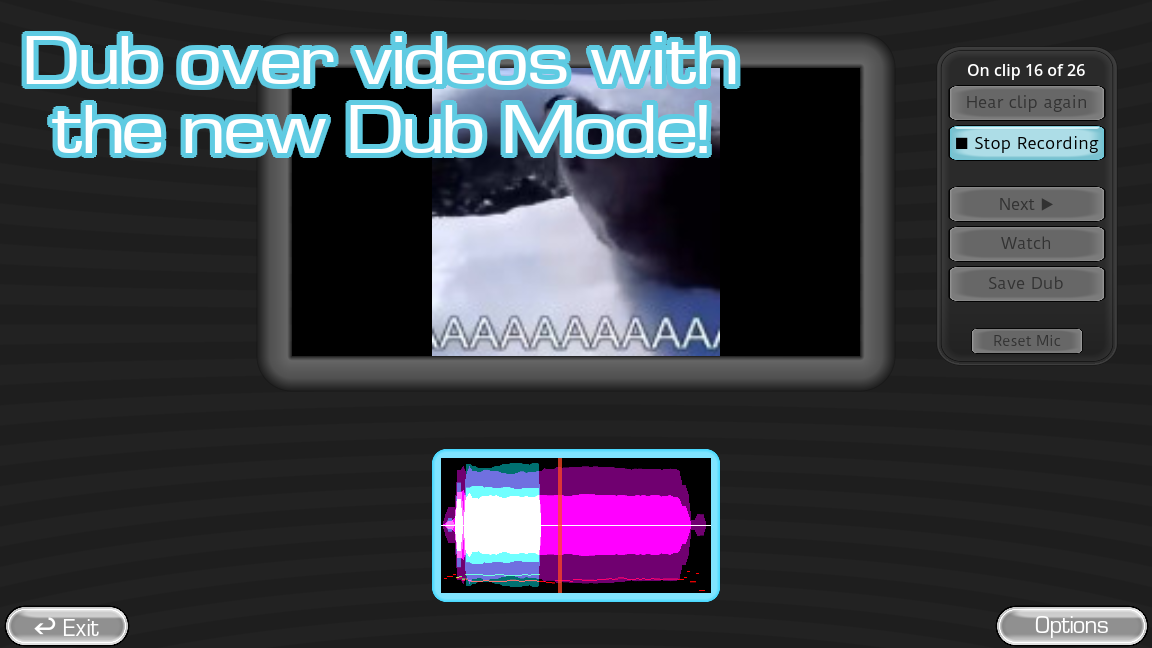
Game screenshots on this page come from YeahMaybe's official itch.io listing for The Choicer Voicer. All game art belongs to YeahMaybe.
Dub Packs FAQ
Related Choicer Voicer pages
After you know how a dub pack differs from a voice folder, get the official client, read the packs guide, or check mods and modpacks.
Get the client, then add one dub pack
Choicer Voicer dub packs are data folders for Dub Mode on the desktop game. Install Windows or Linux from itch.io, then add one trusted archive from YeahMaybe or GameBanana. Do not download a second game to “get dubs.”