
Choicer Voicer GameBanana
GameBanana is where The Choicer Voicer community publishes most of its mods and packs: restyled judges, hosts, studios, menus, voice-clip folders, and Dub Mode scene packs. This guide maps what each GameBanana section contains, how to read a listing before you download it, and how the files install — so a choicer voicer gamebanana search ends with safe content, not a random ZIP.
choicervoicer.info is an independent fan site. We are not affiliated with YeahMaybe or GameBanana. This page links to the community hub and does not host any files.

What You Can Find on GameBanana
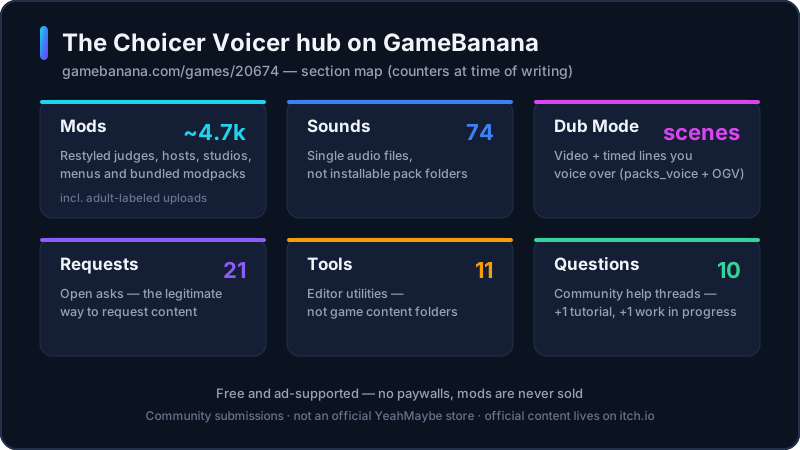
GameBanana hosts a public hub for The Choicer Voicer at gamebanana.com/games/20674. It is a community index: creators upload their own files, and the hub sorts them into sections. At the time of writing, the hub shows a Mods section with a counter just over 4,700 uploads (4,729 when we checked), 74 Sounds, 21 open Requests, 11 Tools, 10 Questions, a Tutorials section, and a Work-In-Progress section. The counters move as creators post, so treat the hub as the source of truth.
The GameBanana model matters for safety. The site is free and ad-supported — its own banner states that it has no paywalls and does not sell mods. That still does not make every listing trustworthy: uploads are community submissions, the hub mixes voice mods, tools, and adult-labeled content, and GameBanana is not an official YeahMaybe property. The developer’s official content lives on itch.io.
Use this page as the map. The two sections below split the hub into mods and packs, the checklist shows how to read a listing before downloading, and the install steps are the same for every content folder. If you want the game itself rather than content for it, use the download guide.
Choicer Voicer Mods on GameBanana
The Mods section is where restyled shows live: new judges, hosts, contestant designs, studio sets, menu themes, and modpacks that bundle several of these. Community titles are inconsistent — a “host pack” or “judge pack” on GameBanana may be uploaded as a mod. The test is the slot the archive fills, not the word in the title.
When you open a listing, read what the author states: which slots it replaces, which game version it targets, and whether it includes in-game screenshots. The mods guide on this site explains how these folders differ from voice packs and dub packs; the hub is where the files are, not a review site.
The hub also shows a Requests section — 21 open at the time of writing — where players post ideas for creators to pick up. If the content you want does not exist yet, that is the legitimate route to ask for it.
Choicer Voicer Packs on GameBanana
Packs on the hub are the content folders the game reads: voice packs (folders of clips you imitate), contestant packs, studio and menu packs, and host or judge content. YeahMaybe’s official Packs & References on itch.io remain the safest first install because they match the current client; GameBanana is the community extension of that ecosystem.
Dub Mode content sits in its own category: GameBanana’s Dub Mode category collects scene packs — a video plus timed lines that you voice over. Archives there typically include a packs_voice folder with the timed lines and a dub_video file, and some use the OGV video format. The dub packs guide covers that format in depth.
The Sounds section — 74 submissions at the time of writing — is not the same thing as packs: those are individual audio files, not installable folders. Tools are editor utilities. Keep the sections apart when you search, because a listing’s section tells you what the download actually is.
How to Check a Pack Before Installing
Run this checklist before any Choicer Voicer GameBanana download. It takes a minute and filters out most of the junk.
Author and listing
A named author with other uploads and a filled-out description beats an anonymous one-file account. Prefer listings that state the author, the game version, and which slots the archive fills.
The section tells you the type
Mods, Sounds, Tools, and Dub Mode are different downloads. A voice pack posted under Tools is a labeling red flag, not a bonus.
Read the content labels
The game page mixes adult-labeled listings with normal edits. GameBanana marks those; read the label before you click a preview, especially on a shared screen.
No extra installers
A real pack is a ZIP you extract yourself. Walk away from any listing or mirror that wraps the download in an .exe or a second downloader.
Version match
Packs target a client build. If the listing names a version, compare it to yours; a folder built for an older build can fail to load.
Comments and ratings
GameBanana listings carry community feedback. Broken-install reports in the comments are a better warning than any description.
How to Install a GameBanana Pack, Step by Step
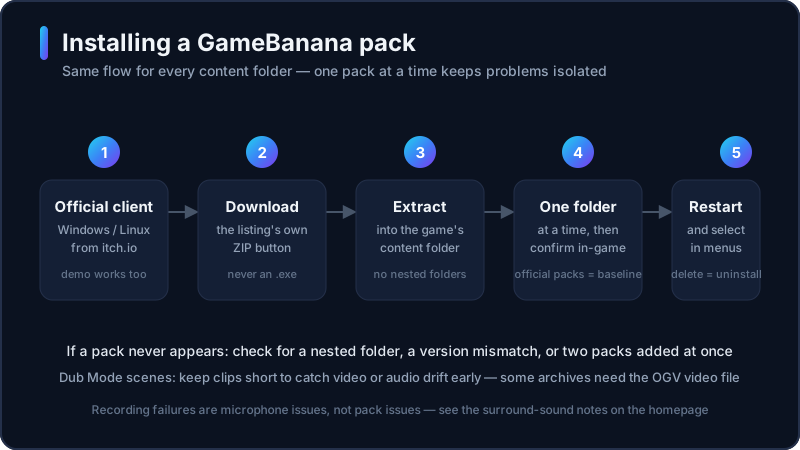
Every Choicer Voicer GameBanana content folder installs the same way: download the ZIP, extract it into the game, and add one folder at a time so a bad pack is easy to isolate.
- 1
Get the official client first
The game reads content folders from the official Windows or Linux client on itch.io. Content does not work without the game, and the free No Gameplay Demo is enough to test packs.
- 2
Download the ZIP from the listing
Use the GameBanana listing’s own Download button and save the archive somewhere you control. Do not run any .exe that claims to install packs for you.
- 3
Extract, do not nest
Unzip the archive into the game’s content folder. A folder-inside-a-folder is the most common reason an installed pack never appears.
- 4
Add one pack at a time
Install a single folder, start the client, and confirm the content shows up. Keep the official Packs & References as your known-good reference.
- 5
Restart and select in-game
Content appears in different menus: studios and hosts on the setup screen, voice clips in the pack list, Dub Mode scenes inside Dub Mode. Restart the client after adding files.
- 6
Remove by deleting the folder
No uninstaller is needed. Delete the pack folder, restart, and the game falls back to defaults. That is also how you isolate a pack that breaks a session.
Common Problems
A pack does not appear in the menus. The usual causes are a nested folder after extraction, a pack built for a different client version, or two new packs added at once. Install one folder at a time, compare the listing’s stated version, and delete the newest addition when a session breaks.
Dub Mode scenes drift out of sync. That is a property of long scenes rather than your setup: run a short clip first so you catch video or audio drift before committing to a long take, as the dub packs guide recommends. A missing OGV video file is another common cause.
Problems that look like broken packs but are not: recording failures are microphone and output issues — the surround-sound bug is documented on our homepage — and a game that will not start at all is an install problem, not a pack problem. Fix the client with the official demo before blaming community content.
Community Packs on Screen
A GameBanana download ends up exactly where an official pack does: a folder entry on the Customize screen that you select per slot.
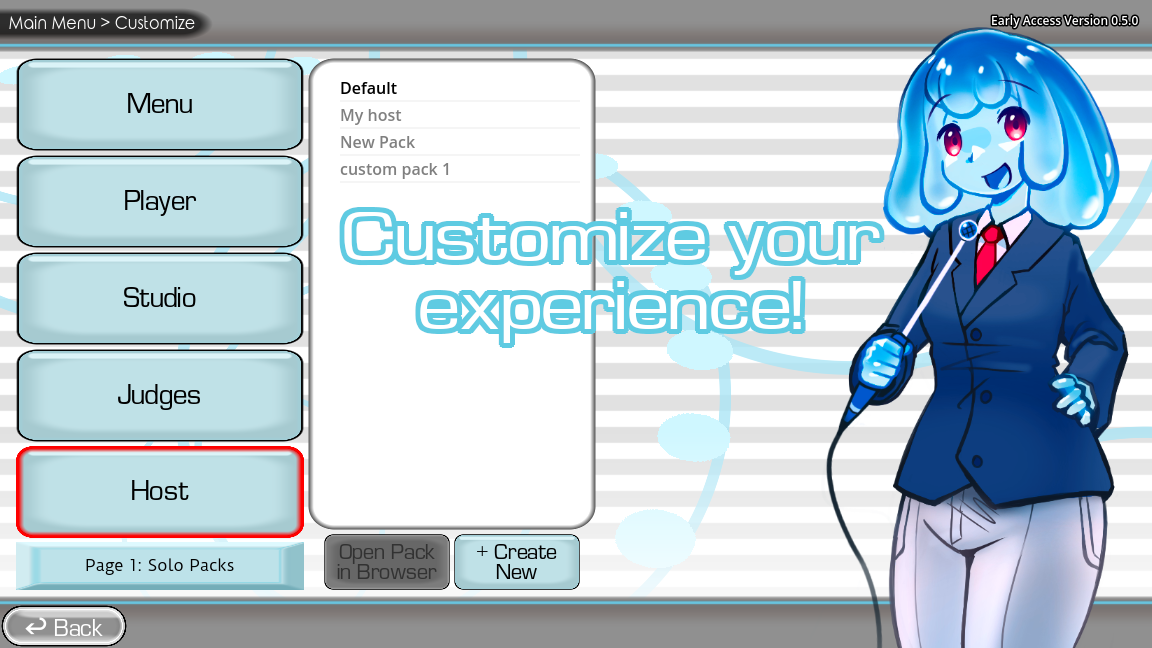
Game screenshots on this page come from YeahMaybe's official itch.io listing for The Choicer Voicer. All game art belongs to YeahMaybe.
GameBanana FAQ
Related Choicer Voicer pages
When you know which folder type you need, compare pack types, restyle the show with mods, or learn the core listen-and-perform loop first.
Read the listing, then install one folder at a time
GameBanana is where the community publishes, itch.io is where the game lives, and this guide is the bridge. Check the author and version, extract the ZIP yourself, and keep official packs as your reference.