
Choicer Voicer Mods
Searches for Choicer Voicer mods, Choicer Voicer modpacks, or a single Choicer Voicer mod usually want custom shows: new judges, hosts, studios, menus, or bundled community folders. This page explains what that content is, where it lives, and how to add it without treating a ZIP as the game itself.
choicervoicer.info is an independent fan site. We are not affiliated with YeahMaybe. This page does not host mods, modpacks, or game files.
What Are Choicer Voicer Mods?
YeahMaybe built The Choicer Voicer as a blank studio. The itch.io listing says little content is built in: customize the menu, studio, judges, host, and contestants, or drop audio into a folder. Community folders that restyle that show are what people mean by Choicer Voicer mods.
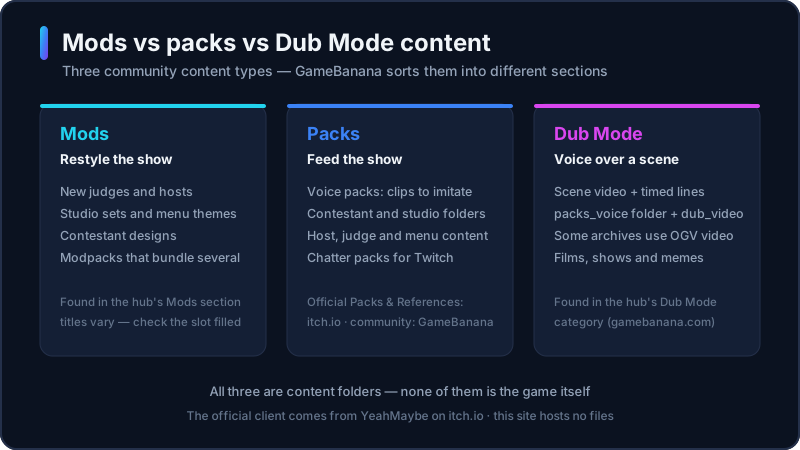
A Choicer Voicer mod is usually a folder or archive that swaps presentation, not a patched .exe. Voice clips you imitate are packs. A visual or character swap is a mod. A bundle that ships several of those folders together is a modpack. None of those files replace the Windows or Linux client.
The unofficial browser player on this site cannot load community folders. Choicer Voicer mods run on the official desktop game. If you still need the installer, use the download guide. Stay here when the question is custom content, not “where do I buy the game.”
Mods vs Packs vs Dub Packs
Packs are the lines you perform. Official types on itch.io include voice, menu, judges, studio, host, and contestant packs. A voice pack is audio you imitate. Host, judge, and studio packs change who talks around you and where the show sits.
Listings for the choicer voicer mods often mix those pack types into one download. The useful test is: does this archive change the show’s look and cast, or only the clips you voice? If it only adds lines, treat it as a pack even if the page says “mod.”
Dub packs belong to Dub Mode. They usually include video, timed lines, and captions so you can voice a scene, not restyle the studio. Use the dedicated dub packs page for that workflow and keep this page for mods and modpacks.
Where to Find Choicer Voicer Modpacks
Start with YeahMaybe’s itch.io listing. The store page publishes Packs & References that show the folder layout the current client expects. Official samples are the safest first install because they match the build you just downloaded.
Community Choicer Voicer modpacks mostly circulate on GameBanana’s hub. Prefer a page that names the author, the game version, and what folders the archive contains.
This site does not mirror ZIPs. A “free full game plus mods” archive is not a Choicer Voicer mod. Get the client from itch.io, then add one community folder at a time so a bad file is easy to remove.
The GameBanana Hub at a Glance
GameBanana hosts a public The Choicer Voicer section for mods, tutorials, and tools. The hub is a community index, not an official YeahMaybe store. Listings mix visual mods, voice folders, dub scenes, and editor utilities under the same game page.
The dedicated GameBanana guide on this site maps every hub section, the listing checks, and the install steps. Open the hub, read the file type and install notes, and check screenshots against the current desktop client. Skip pages that hide the author or wrap the download in an extra installer.
People also search “choicer voicer mods gamebanana.” This page answers whether that hub is a real source. It does not copy their catalog.
How to Install Mods
Exact folder names can change between client builds. Follow the author’s notes and YeahMaybe’s Packs & References. These steps cover a typical Windows or Linux install.
- 1
Install the official client first
Buy or update The Choicer Voicer from YeahMaybe on itch.io. Mods are data for that app. They will not run in the unofficial browser player.
- 2
Read the listing before you download
Confirm the author, the stated game version, and whether the archive is a visual mod, a voice folder, a dub pack, or a mixed modpack.
- 3
Download one archive
Save the ZIP to a folder you control. Do not run an unknown .exe that claims to “inject” mods.
- 4
Extract, then match the official layout
Unzip the files and place the folders where the author and the official Packs & References say they belong. Nested extra folders are a common load failure.
- 5
Launch the desktop client and select the content
Open the Customize menu. If the new host, studio, judges, or voice folder does not appear, the path or version is wrong — not a missing store app.
- 6
Add the next folder only after this one works
Stacking five untested archives makes a crash hard to isolate. Keep official defaults as a known-good backup.
Mod Safety Checklist
The client comes from itch.io
YeahMaybe’s store is the official Windows and Linux source. A “modded game” build is not a Choicer Voicer mod.
The archive is content, not the installer
Expect folders of audio, images, or scene files. A second game executable is a warning sign.
Author, date, and version are visible
Skip anonymous mirrors. A Choicer Voicer mod built for an older client can fail on the current recommended build.
You can name the folders you added
If you cannot tell which folder you just dropped in, you cannot roll back. Extract one archive at a time.
NSFW and extra tools get a second look
Community hubs mix scenes, editors, and adult listings. Open only what you asked for, and do not grant an unknown helper app microphone access.
Popular Mod Categories
These are the content types YeahMaybe and community hubs describe, including mixed Choicer Voicer modpacks. This is not a ranked download list and we do not host files.
Visual and studio mods
Studios, menus, and board art that make the same voice lines feel like a different broadcast.
Host, judge, and contestant swaps
Character packs that change who introduces the round and who reacts to your take.
Voice mods and clip folders
Audio you imitate. Community pages often label these as mods even when they are voice packs.
Mixed Choicer Voicer modpacks
Bundles that ship several folder types together. Install the whole set only if the listing says the versions match.
Dub scenes and editors
Dub Mode content and community tools for making it. Use the dedicated dub packs page for that workflow, not this mods list.
Where a Mod Shows Up In Game
Mods are folders the client reads from the same Customize screen — a restyled host or judge replaces a slot instead of adding a new menu.
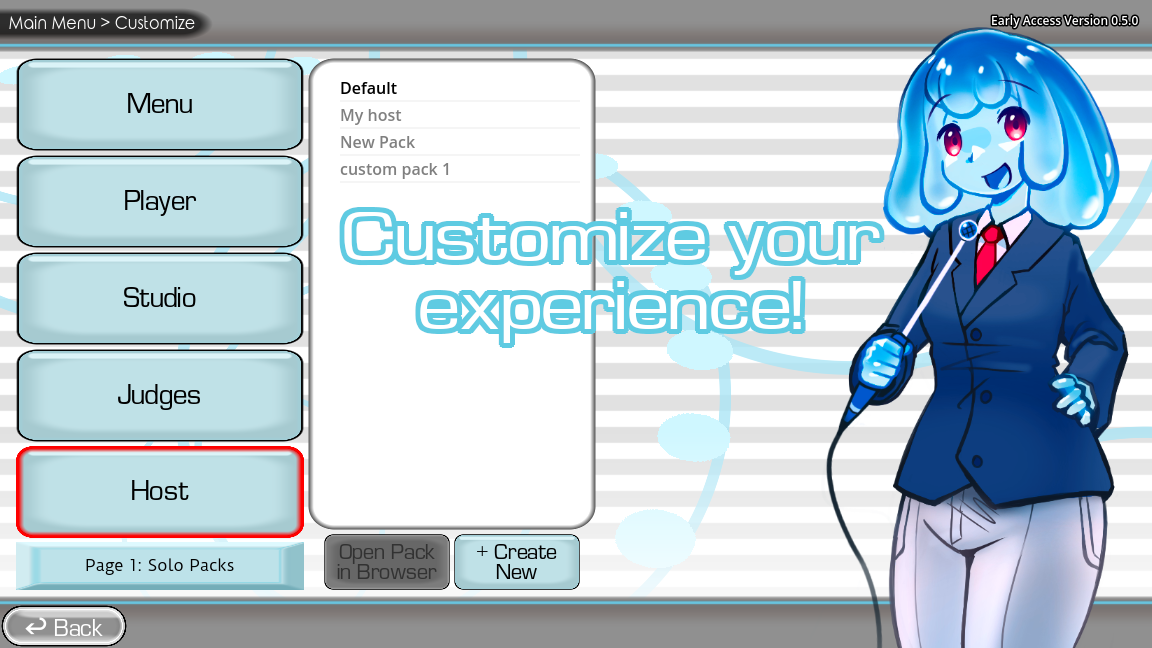
Game screenshots on this page come from YeahMaybe's official itch.io listing for The Choicer Voicer. All game art belongs to YeahMaybe.
Mods FAQ
Related Choicer Voicer pages
After you know how mods differ from packs, get the official client, try the browser player, or read the dub packs guide.
Install the client, then add one folder
Community mods are data for the official desktop game. Get the Windows or Linux client, then browse a trusted listing. Do not install a second copy of the game to “get mods.”